Meeting minutes template (free to copy) and how to fill it in fast
October 11, 2026 · 6 min read
Minutes have one job: a week later, anyone who reads them should know what was agreed and who is responsible for what, without having been in the room. Most minutes fail that test because they are either too thin (“discussed the launch”) or too long (two pages of who said what).
Below is a plain-text template you can paste into Notes, Pages, Word, a shared doc or an email. It is followed by what to write in each part, a short example, and a few habits that make minutes fast to write and easy to act on.
The template
Copy it as it is, delete the parts a short meeting does not need, and keep the order: readers look for decisions and action items first, so they come before the long discussion notes or right after a one-line summary.
MEETING MINUTES

Meeting: [title]
Date and time: [date], [start]–[end]
Place / link: [room or video link]
Chair: [name]
Note-taker: [name]
Attendees: [names]
Absent: [names]

AGENDA
1. [item]
2. [item]
3. [item]

SUMMARY
[Two or three sentences: what the meeting was for and what came out of it.]

DISCUSSION
1. [item]: [key points, options considered, main concerns]
2. [item]: [key points]
3. [item]: [key points]

DECISIONS
- [decision, stated in one line]
- [decision]

ACTION ITEMS
- [task] — [owner] — [due date]
- [task] — [owner] — [due date]

OPEN QUESTIONS
- [question] — [who will find out] — [by when]

NEXT MEETING
[date, time, place / link]
What goes in each part
- Header (meeting, date, place, chair, note-taker): fill it in before the meeting starts. It takes a minute and saves you from guessing later.
- Attendees and absent: list absentees too. It tells readers who still needs to be told about a decision.
- Agenda: the items as they were planned. If the meeting went off-agenda, add the extra topic at the end rather than rewriting the list.
- Summary: two or three sentences for the person who reads nothing else.
- Discussion: only what someone needs to understand a decision — the options considered and the main concern. Not who said what, word for word.
- Decisions: one line each, written as a fact. “The launch moves to October 28” is a decision; “we talked about the launch date” is not.
- Action items: always task, owner and due date. If the meeting did not set a date, write “date to be agreed” and make that an open question.
- Open questions: what was raised but not settled, with who will come back with an answer.
- Next meeting: date and time if one was set.
How to fill it in fast
- 1Before the meeting, paste the template into a new document and fill in the header and the agenda.
- 2Record the meeting if everyone agrees, so you can listen instead of writing every sentence. Tell people at the start.
- 3During the meeting, write only decisions and action items as they happen, in the template’s own sections. Note the time next to anything you want to check on the recording.
- 4Right after the meeting, while you still remember, fill in the summary and the open questions.
- 5Go through the recording or its transcript only for the moments you marked, and complete owners and due dates.
- 6Read the action items once more: does every task have exactly one owner and a date?
- 7Send the minutes to attendees and absentees within 24 hours and ask for corrections by a set time.
A short example
Here is what the important part looks like for a 30-minute product meeting:
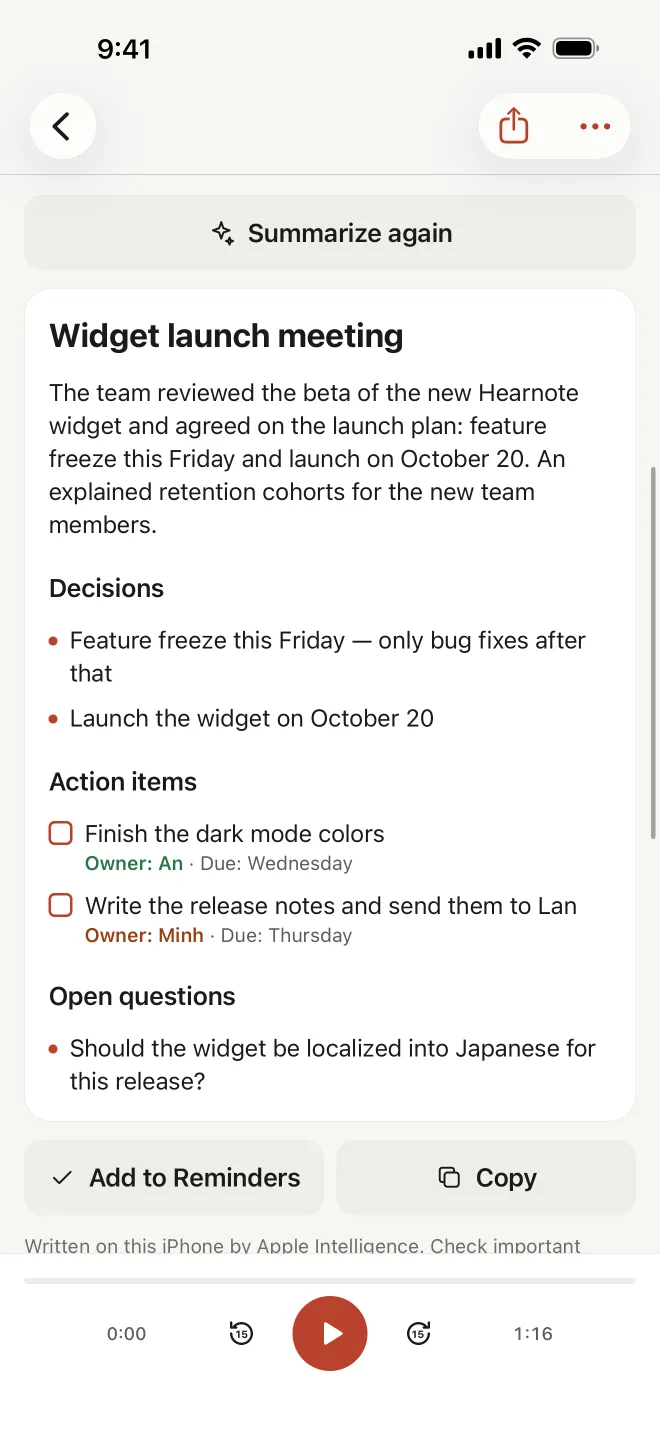
Summary: The team reviewed the beta of the new home-screen widget and agreed the launch plan.
Decisions: Feature freeze this Friday — only bug fixes after that. The widget launches on October 20.
Action items: Finish the dark mode colours — An — Wednesday. Write the release notes and send them to Lan — Minh — Thursday.
Open questions: Should the widget be localised into Japanese for this release? — Lan — next meeting.
Anyone who missed the meeting can read those few lines in under a minute and know what changed for them.
Let Hearnote fill in the template for you
If you record meetings on an iPhone, Hearnote can do most of the work above on the device. It records, transcribes Vietnamese or English with Apple’s speech recognizer, and on an iPhone with Apple Intelligence (iPhone 15 Pro or later, with Apple Intelligence on and supporting the language) writes notes in a Meeting template: a title, a summary, decisions, action items with an owner and a due date where they were mentioned, and open questions.
Paste them under the header of your template, check them against the transcript — tap any line to hear the sentence — and send. Action items can go straight to Reminders or Calendar, and the whole recording exports to Word (.docx), Markdown or plain text. If your team uses its own minutes format, you can create a custom template so the notes come out in that structure.
The Meeting template, custom templates, sending action items to Reminders or Calendar and Word export are part of Hearnote Pro; the free version includes Quick-note summaries and TXT/Markdown export, and the sample recording in the app shows the Meeting notes with every Pro feature unlocked. Audio, transcript and notes stay on the iPhone — no account, nothing uploaded.
Frequently asked questions
- What is the difference between meeting minutes and meeting notes?
- Notes are whatever you jot down for yourself. Minutes are the shared record: who attended, what was decided, who does what by when and what is still open. They are written so someone who was not there can act on them.
- How long should meeting minutes be?
- As short as possible while still standing on their own. For a typical one-hour meeting, a summary, a handful of decisions and a clear action list usually fit on one page.
- Should minutes record who said what?
- Usually not. Record decisions and the reasoning someone needs to understand them. Formal bodies such as boards may have their own rules about recording names and votes; follow those where they apply.
- When should minutes be sent?
- Within 24 hours, while people remember the meeting well enough to correct a mistake. Send them to absentees too.