How to record lectures and turn them into study notes and flashcards
October 11, 2026 · 6 min read
A recorded lecture is only useful if you go back to it, and most people don’t. Two hours of audio is too long to replay, so the file sits in your phone until the night before the exam, when it’s too late to do anything with it.
The trick is to treat the recording as raw material, not as the notes. This guide shows how to record a lecture well, how to turn it into a compact set of study notes, and how to get from those notes to flashcards you actually review. Everything up to the last two sections works with the iPhone you already have.
Before class: permission and setup
Ask first. Many lecturers are happy to be recorded for personal study, some prefer you don’t, and some universities have a written policy. A short message before the first class is enough, and it avoids an awkward moment later. Never share a recording of a lecture without permission.
Then set up for sound, because a muddy recording is useless whatever you do with it later:
- Sit in the first few rows, or put the phone on the desk in front of you with the microphone (the bottom edge) pointing at the speaker.
- Turn on Do Not Disturb or a Focus mode so calls and notifications don’t interrupt anything.
- Check free storage and battery. A long lecture is a long file.
- Keep the phone still. Fiddling with it, typing or setting it down on a hard surface makes loud noises right next to the microphone.
During class: listen, and mark the moments
The point of recording is that you no longer have to write everything down. Use that freedom to listen and think, and write only what the audio can’t give you: a diagram on the board, a page number, a “this will be on the exam”.
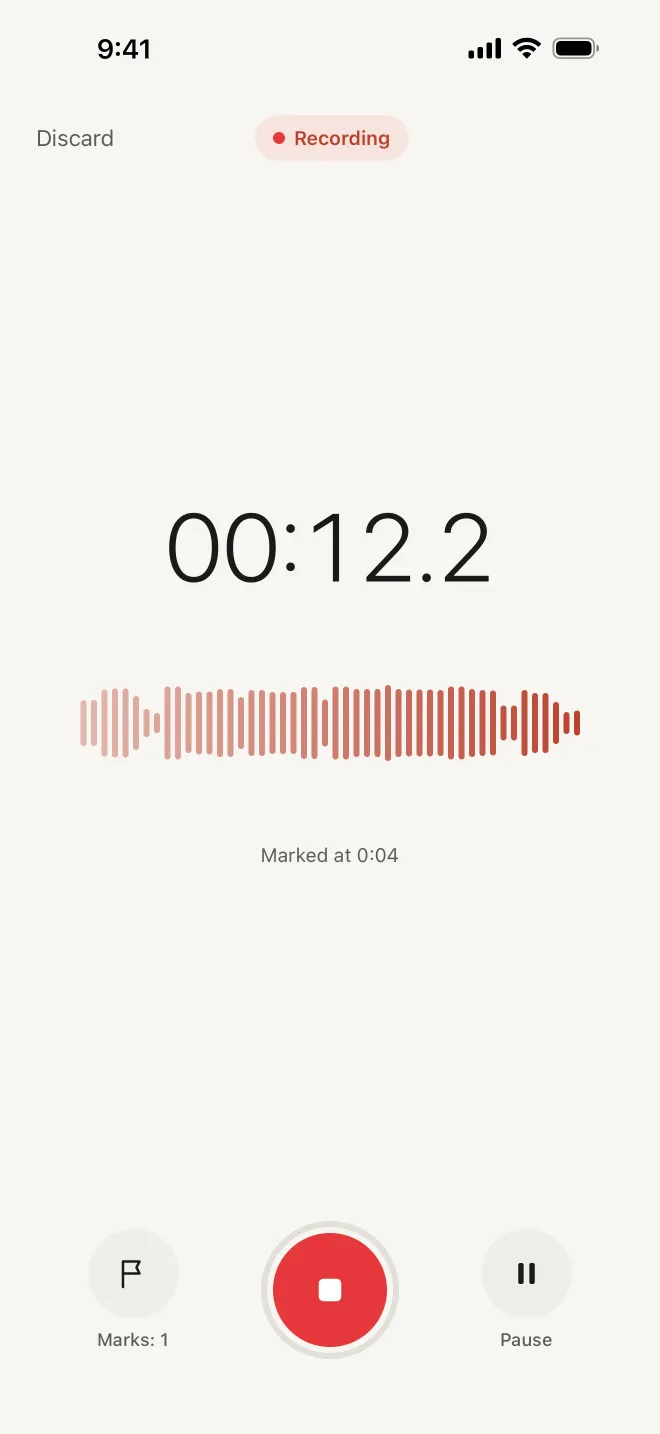
Mark the moments you’ll want to find again. With Voice Memos you can’t drop markers while recording, so the simplest method is to note the time on paper or in Notes (“42:10 — definition of elasticity”). If you have a recorder app with a marker button, tap it whenever the lecturer says something important, asks a question you couldn’t answer, or puts up a slide you didn’t catch.
Those few marks are what makes a two-hour file navigable later. Without them you’re scrubbing through audio trying to remember roughly when something was said.
After class: from recording to study notes
Do this the same day, while you still remember the context. It takes far less time than replaying the lecture.
- 1Name the recording properly: course, week and topic (“Microeconomics W4 — Elasticity”). In Voice Memos, tap the title to rename it, and favourite the ones you’ll study from.
- 2Get the words in text. On recent iOS versions the Notes app can record audio and show a transcript for supported languages; check whether yours does. Otherwise, listen to your marked moments only.
- 3Write a one-page outline: the 4–6 main points of the lecture in the order they came, each with one or two supporting lines.
- 4List the key terms with a one-sentence definition in your own words. Definitions you wrote yourself stick better than copied ones.
- 5Add what the recording can’t hold: the diagram from the board, the formula from the slide, the reading the lecturer mentioned.
- 6Turn each key term and each “why” or “how” question into a flashcard: question on the front, short answer on the back.
- 7Keep everything for one course in one place: a folder in Notes or Files, or a notebook, so revision isn’t a search.
Use the flashcards the way that works
Re-reading notes feels productive, but it mostly makes material feel familiar. Two habits do more: retrieval practice (trying to recall the answer before you look) and spacing (reviewing over several days instead of in one long session). Both are well-supported study techniques, and flashcards make them easy.
- Say or write the answer before you flip the card. If you can’t, that’s the card that needs work.
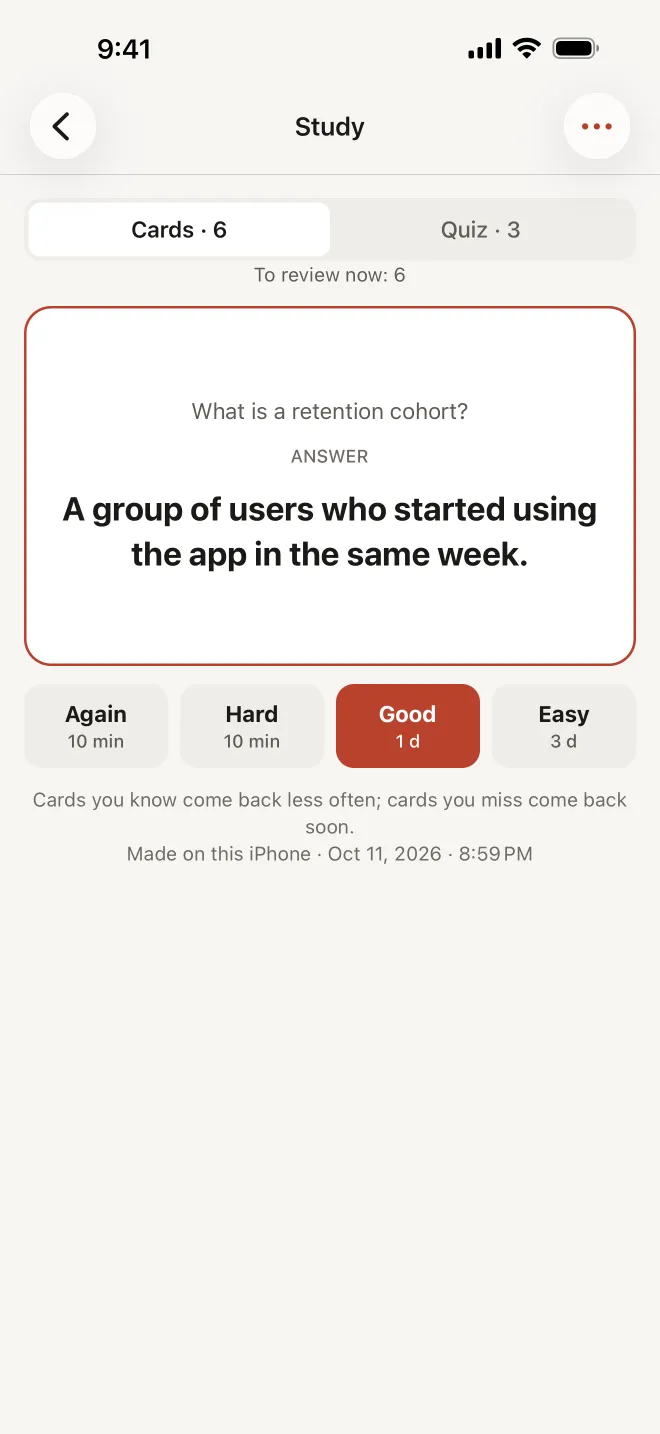
- Sort cards by how well you knew them. Hard ones come back tomorrow; easy ones in a few days, then in a week.
- Keep sessions short and frequent: ten minutes a day beats three hours the night before.
- Mix in a few questions that ask you to explain, not just define. Exams usually do.
If you like paper, the Cornell layout works well with recordings: a narrow left column for questions, notes on the right, a summary at the bottom. The left column becomes your flashcards.
How Hearnote does it on your iPhone
Hearnote is built for exactly this workflow, and it does it on the device: nothing is uploaded and there’s no account.
- Recording that holds up: it records for hours, keeps going with the screen locked or when you switch apps, and if the app closes or the phone dies, the next launch recovers the recording up to the last few seconds.
- Mark while you listen: tap Mark during the lecture and each mark is a point you can jump back to.
- A transcript in Vietnamese or English, made on the iPhone (iOS 26; the language model downloads from Apple once). Every line has a timestamp; tap it to hear the lecturer say it.
- The Lecture template (Hearnote Pro) writes a title, a summary, an outline and the key terms. Summaries need Apple Intelligence, so an iPhone 15 Pro or later.
- Chapters and key moments (Hearnote Pro) split a long lecture into parts you can skim.
- Study mode (Hearnote Pro) makes flashcards from the lecture and schedules them with spaced repetition — you rate each card Again, Hard, Good or Easy — plus a quick quiz.
- Custom vocabulary (Hearnote Pro) helps with course names and jargon, and on-device translation between Vietnamese and English (Hearnote Pro) helps when the lecture and your notes aren’t in the same language.
- Folders, tags and favourites keep each course together, and you can export the notes as TXT or Markdown (Word and SRT with Hearnote Pro).
The free tier records without limit and transcribes 3 recordings and up to 60 minutes a week. The sample recording in the app has every Pro feature unlocked, so you can see the outline and flashcards before deciding anything.
A weekly routine that keeps you ahead
- Same day: rename the recording, make the outline and the key terms (or check the ones Hearnote wrote and fix anything wrong).
- Next day: first flashcard review, ten minutes.
- During the week: review whatever is due, and re-listen only to the marked moments you still don’t understand.
- Before the exam: run the quiz for each lecture, then go back to the transcript for the topics you missed.
By exam week you’re reviewing cards you’ve already seen several times, not discovering the material for the first time.
Frequently asked questions
- Is it allowed to record a lecture?
- It depends on the lecturer and the school. Ask before you record, follow any written policy, and keep the recording for your own study. Don’t post or share it without permission.
- Where should I put my iPhone in a lecture hall?
- As close to the speaker as you can, on a still surface, with the bottom edge (where the microphone is) facing them. The first few rows make a much bigger difference than any setting.
- Does Hearnote need internet to transcribe a lecture?
- No. Transcription runs on the iPhone. The first time you use a language, iOS downloads its speech model from Apple once; after that it works in a hall with no Wi‑Fi.
- Do I need Apple Intelligence for flashcards?
- Summaries, the Lecture outline and the flashcards are written by Apple Intelligence on the device, so they need an iPhone 15 Pro or later with it turned on. The recording, the transcript, search and export work without it.