Fix wrong names in a voice transcript on iPhone
November 9, 2026 · 6 min read
You turned a recording into text and the transcript is good, except for the names. “Linh” became “lên”, your company name came out as two ordinary words, and a product name is spelled three different ways. Names and jargon are where every speech recognizer slips, because it has to guess between real words that sound alike.
This guide shows why it happens, how to fix a transcript by hand with any tool, and how Hearnote lets you correct a word once and remembers it. It also says plainly what a correction rule can get wrong, so you can use it without surprises.
Why does a transcript get names and technical words wrong?
A recognizer picks the most likely words for the sounds it hears. A name that is also a normal word (in Vietnamese, “Linh” next to “lên” or “liên”) is easy to mishear, and a company or product name it has never seen has to be spelled out of ordinary words. Accents matter too: in Vietnamese, one missing or wrong tone mark gives a different word.
Background noise, people talking over each other and a phone far from the speaker make it worse. A closer microphone helps, but even a clean recording will not get every name right. The practical answer is a quick way to correct them, once.
How do I fix a word in a transcript, step by step?
These steps work with any transcript and any tool; the Hearnote version follows in the next section.
- 1Make a list of the names and terms that matter in this recording: people, companies, products, places. Check the spelling from a reliable source, such as an email signature or a slide.
- 2Read the transcript with the audio playing, and mark each place where one of those words is wrong. Names are rarely wrong in only one spot.
- 3Fix each one. In a plain text editor with find and replace, replace the wrong form with the right one. Look at what you are replacing first: if the wrong form is also a real word, replacing it everywhere will change sentences that were correct.
- 4Keep case and accents. “Lan Anh” and “lan anh” are not the same on a business card, and in Vietnamese “lần” is not “Lan”.
- 5Listen again to a few corrected lines to be sure the fix is the word that was actually said.
- 6Save your list of corrections. The same names will come back in the next recording, and you will not want to retype them.
How do I fix a wrong word in Hearnote, and make it stick?
Hearnote is an iPhone recorder that transcribes on the device. Fixing a word is free; you do not need Hearnote Pro for it.
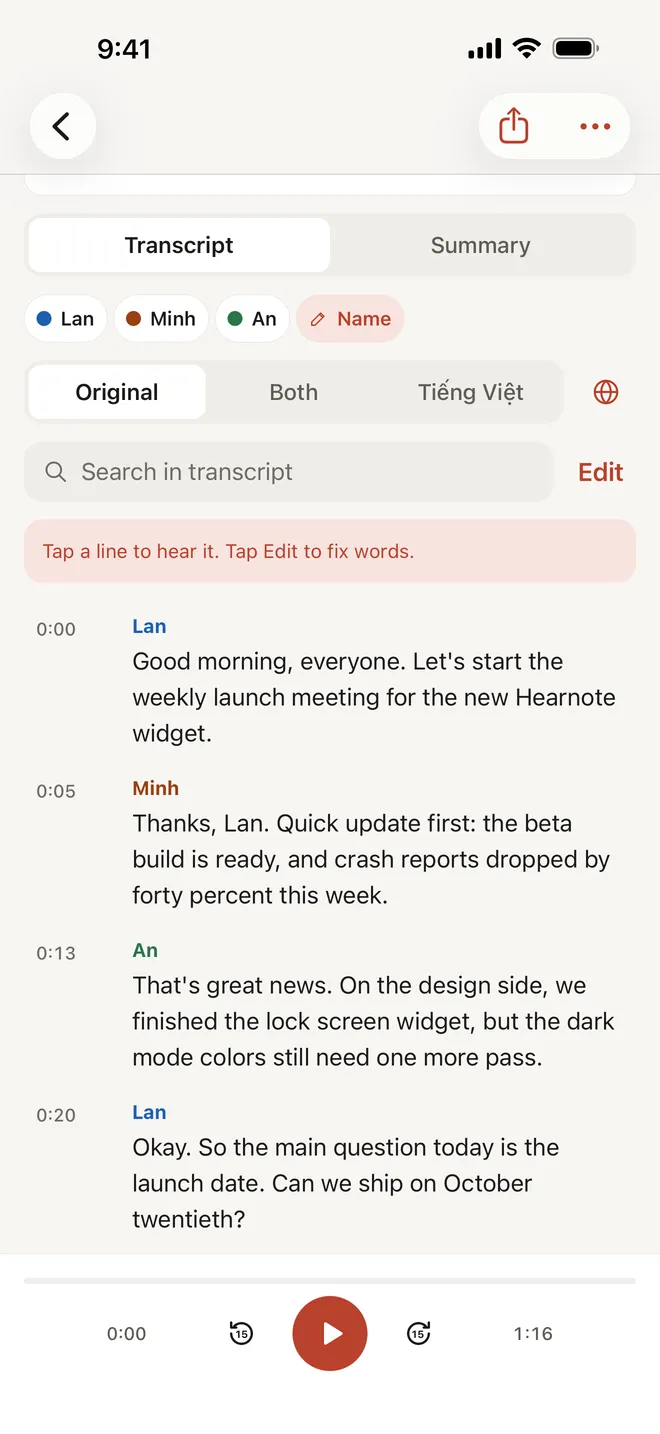
- 1Open the recording and go to the Transcript tab. The hint above the text reads: “Tap a line to hear it. Hold a word to fix its spelling.” Tapping a line plays the audio from there, so you can hear what was said.
- 2Hold the wrong word. The Fix a word sheet opens, with a field called Correct spelling.
- 3Type the right spelling and save.
- 4If the same word is wrong in several places, use “Fix every ‘word’ in this recording”. The sheet tells you how many lines it appears in before you confirm.
- 5Leave “Always use this spelling” on. It is on by default. New transcriptions and imports will then write your spelling wherever the recognizer writes the old one.
- 6If you are searching the transcript, hold the line and pick the word from the sheet instead. With VoiceOver, use the Fix a word action.
How do I see or undo the corrections I made?
Open Settings and then Custom vocabulary. Under “Spellings you fixed” you will find every rule, each with a × to remove it. Remove a rule and Hearnote stops applying it to new transcriptions.
The same screen has “Fix spelling in existing transcripts”. It applies your rules to recordings you made earlier and tells you how many lines it updated.
What can a correction rule get wrong?
A rule replaces a whole word, ignoring upper and lower case but not accents. That is simple and predictable, and it has one trade-off you should know about:
- If the wrong form is also a real word, the rule changes the real word too. A rule from “lên” to “Linh” rewrites every “lên” the recognizer writes, including the places where someone really said “lên”. The sheet says exactly which word it will write where.
- Accents count. “lần” is never treated as “Lan”.
- Rules do not chain; each runs once on the original word.
If a rule does more harm than good, remove it in Settings; one tap undoes it. For a word that is both a name and an ordinary word, it is often better to fix it in this recording only and switch “Always use this spelling” off.
What does Hearnote Pro add for names?
Custom vocabulary is a Hearnote Pro feature. You add names, company names and jargon (up to 100 terms), and Hearnote gives them to the recognizer as hints before it transcribes, and writes them with your capitalization, such as “SwiftUI” or “Lan Anh”. With Hearnote Pro, correcting a word with “Always use this spelling” also adds the corrected word to your vocabulary.
A hint is a nudge, not a guarantee, and Hearnote publishes no accuracy figure for it. Hold on to the fix-a-word habit even with Hearnote Pro: check names against the audio before you send the text to anyone.
| Step | By hand, any tool | Hearnote | Hearnote Pro |
|---|---|---|---|
| Fix one word | Find and replace | Hold the word, type it | Same |
| Fix every match in a recording | Replace all | Yes | Yes |
| Remember the fix for new recordings | Your own list | “Always use this spelling” | Same, plus a hint to the recognizer |
| Add names before transcribing | — | — | Custom vocabulary |
| Leaves the iPhone | Depends on the tool | No | No |
Do my recordings and corrections stay on my iPhone?
Yes. Recordings, transcripts and your correction rules stay on your iPhone. There is no account. Summaries and Ask Hearnote answers need an iPhone with Apple Intelligence; transcription and fixing words do not. On the free tier, Hearnote transcribes up to 3 recordings and 60 minutes a week. Before you record other people, check the rules where you live and tell the participants.
Frequently asked questions
- Why does my iPhone transcript spell names wrong?
- A recognizer picks the most likely real words for the sounds it hears. Names that are also normal words, brand names and jargon are easy to mishear, and in Vietnamese a wrong tone mark gives a different word. Correct them once and keep your corrections.
- How do I correct a word in a Hearnote transcript?
- Open the Transcript tab, hold the wrong word, type the correct spelling in the Fix a word sheet and save. Use “Fix every word in this recording” if it appears more than once.
- Is fixing a word free in Hearnote?
- Yes. Fixing a word, fixing every match in a recording and “Always use this spelling” are free. Custom vocabulary, where you add names and terms before transcribing, is part of Hearnote Pro.
- Will a correction change real words by mistake?
- It can. A rule replaces a whole word wherever the recognizer writes it, so if the wrong form is also a real word, the real word changes too. Remove the rule in Settings under Custom vocabulary, or fix that recording only.
- Does Hearnote upload my recordings to fix names?
- No. Transcription, corrections and rules run on your iPhone. Recordings and transcripts never leave the device.